|
|||||||
| General Computer/Android Help, News & Info + New Technology Find All The Latest Reports/Reviews in Here. Start a New Thread in Here if You Need Help |
| IMPORTANT ANNOUNCEMENT |
| Hallo to All Members. As you can see we regularly Upgrade our Servers, (Sorry for any Downtime during this). We also have added more Forums to help you with many things and for you to enjoy. We now need you to help us to keep this site up and running. This site works at a loss every month and we appeal to you to donate what you can. If you would like to help us, then please just send a message to any Member of Staff for info on how to do this,,,, & Thank You for Being Members of this site. |
![]() ![]() |
|
|
LinkBack | Thread Tools | Display Modes |
|
|
#1 |
![]() Join Date: Feb 2011
Posts: 50,604
Thanks: 28,767
Thanked 14,428 Times in 10,234 Posts
![]() ![]() ![]() ![]() ![]() ![]() ![]() ![]() ![]() ![]() ![]() |
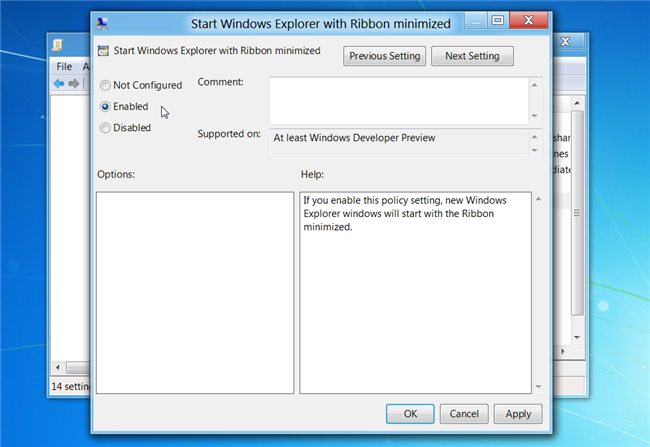
![]() The addition of the Ribbon to Explorer in Windows 8 wasn’t exactly a popular decision—there were outcries from loads of people about how it would make the whole experience bloated and waste space. Here’s the simple solution. Hit the Win+R keyboard shortcut to bring up the Run box, and then type gpedit.msc into the dialog and hit Enter. Browse down to the following section: Computer Configuration –> Administrative Templates –> Windows Components –> Windows ExplorerOnce you’re there, find the option on the right-hand pane for “Start Windows Explorer with Ribbon minimized” and double-click it. ![]() Set the radio button to Enabled, click OK, and close it. ![]() Now whenever you open up a new Explorer window, the Ribbon will be minimized by default. ![]() Thanks to How To "The Geek"
__________________
AMERICA WAS ONCE AN INNOVATED & RESPECTED COUNTRY and THEN ALONG CAME TRUMP..... ![]() That buzz you hear is George Washington spinning in his grave |
|
|
|
![]() ![]() |
| Currently Active Users Viewing This Thread: 2 (0 members and 2 guests) | |
| Thread Tools | |
| Display Modes | |
|
|
![]() |
![]() ![]() |