View Single Post
Old 17-09-11, 15:18   #1
Ladybbird
 
Ladybbird's Avatar
 
Join Date: Feb 2011
Posts: 50,604
Thanks: 28,767
Thanked 14,428 Times in 10,234 Posts
Ladybbird has a reputation beyond reputeLadybbird has a reputation beyond reputeLadybbird has a reputation beyond reputeLadybbird has a reputation beyond reputeLadybbird has a reputation beyond reputeLadybbird has a reputation beyond reputeLadybbird has a reputation beyond reputeLadybbird has a reputation beyond reputeLadybbird has a reputation beyond reputeLadybbird has a reputation beyond reputeLadybbird has a reputation beyond repute

Awards Showcase
Best Admin Best Admin Gold Medal Gold Medal 
Total Awards: 8

Microsoft How to Force Windows 8 to Keep the Explorer Ribbon Minimized


The addition of the Ribbon to Explorer in Windows 8 wasn’t exactly a popular decision—there were outcries from loads of people about how it would make the whole experience bloated and waste space. Here’s the simple solution.


Hit the Win+R keyboard shortcut to bring up the Run box, and then type gpedit.msc into the dialog and hit Enter. Browse down to the following section:
Computer Configuration –> Administrative Templates –> Windows Components –> Windows Explorer
Once you’re there, find the option on the right-hand pane for “Start Windows Explorer with Ribbon minimized” and double-click it.


Set the radio button to Enabled, click OK, and close it.
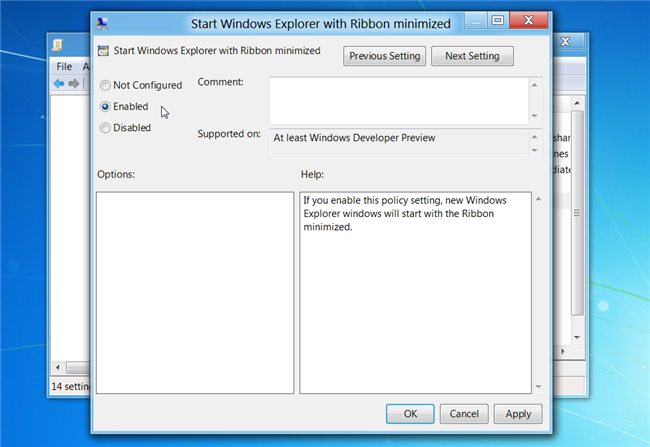
Now whenever you open up a new Explorer window, the Ribbon will be minimized by default.


Thanks to How To "The Geek"
__________________
AMERICA WAS ONCE AN INNOVATED & RESPECTED COUNTRY and THEN ALONG CAME TRUMP.....


That buzz you hear is George Washington spinning in his grave

Ladybbird is online now   Reply With Quote