|
|||||||
| General Computer/Android Help, News & Info + New Technology Find All The Latest Reports/Reviews in Here. Start a New Thread in Here if You Need Help |
| Season's Greetings |
![]() ![]() ![]() ![]() |
| IMPORTANT ANNOUNCEMENT |
| Hallo to All Members. As you can see we regularly Upgrade our Servers, (Sorry for any Downtime during this). We also have added more Forums to help you with many things and for you to enjoy. We now need you to help us to keep this site up and running. This site works at a loss every month and we appeal to you to donate what you can. If you would like to help us, then please just send a message to any Member of Staff for info on how to do this,,,, & Thank You for Being Members of this site. |
![]() ![]() |
|
|
LinkBack | Thread Tools | Display Modes |
|
|
#1 |
![]() Join Date: Feb 2011
Posts: 50,574
Thanks: 28,767
Thanked 14,428 Times in 10,234 Posts
![]() ![]() ![]() ![]() ![]() ![]() ![]() ![]() ![]() ![]() ![]() |
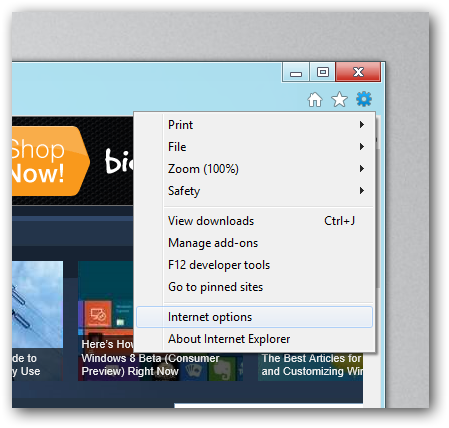
![]() The ability to pin websites to your Start Screen is a nice touch in Windows 8, however by default the sites you pin open with the Metro version of Internet Explorer. Here’s how to change that. Making Pinned Websites Open With The Desktop Version Of Internet Explorer The settings that both Internet Explorers use are controlled through the Internet Options dialog, which can be reached from the desktop version of IE, so go ahead and launch it, then click on the tools button and select Internet Options. Now switch over to the programs tab. Now check the box that says Open Internet Explorer tiles on the desktop. ![]() ![]() Hit the OK button and you’re done, now every time when you open a link it will open with the non-immersive (desktop) version of Internet Explorer. Thanks to Taylor Gibb
__________________
![]() ![]() OOPS...REINDEERS ON STRIKE... ![]() |
|
|
|
![]() ![]() |
| Currently Active Users Viewing This Thread: 2 (0 members and 2 guests) | |
|
|
![]() |
![]() ![]() |